 LalaPos
Issue e-invoices
with a single QR scan
Every printed receipt carries its own QR code — customers scan it themselves and fill in their e-invoice details right on their phone. Cashiers no longer have to ask questions or scribble notes during a rush.
30-day free trial · No credit card required
60 minutes
QR code validity window
0
Times cashiers ask for invoice details
3 steps
From scan to submitted details
30 days
Free trial
Sound familiar?
LalaPos is built to remove exactly this friction when a customer asks for an invoice at checkout.
During a rush, the cashier has to stop and ask for the tax code and company name, and the queue gets longer
Customers scan the QR code and fill in the details on their own phone — the cashier serves the next customer immediately
Handwritten invoice details on paper are prone to typos and wrong tax codes, meaning repeated corrections
Customers enter and double-check their own details before submitting, cutting transcription errors almost entirely
Customers forget to ask for an invoice at the moment of payment, then have no idea who to contact afterward
The QR code is printed on every receipt — customers can scan it any time within 60 minutes of the purchase
New staff have to memorize a multi-step invoicing process and easily miss a step or a field
The whole process runs automatically from the moment the receipt prints to the moment the request arrives — staff have nothing extra to do
Everything you need for invoicing without asking a single question
Built for customer self-service, so cashiers lose no extra time at the counter.
Automatic QR code on every receipt
No extra setting to turn on — every receipt LalaPos prints already carries a QR code linking straight to the invoice-detail form for that exact order.
No app to install, no login required
Customers just point their phone camera at the code and the page opens right in the browser — no app download, no account needed.
Supports both personal and business invoices
Customers pick the invoice type themselves: personal (name, phone number) or business (tax code, company name), all on the same screen.
Link expires automatically after 60 minutes
Each QR code stays valid for only 60 minutes after printing, limiting the risk if a paper receipt is lost or seen by someone else.
Requests land straight in your pending list
Whatever the customer submits is recorded in the system immediately — the shop owner just opens the e-Invoice section to issue it, with nothing to track down manually.
Syncs with compliant e-invoicing
Works directly with the tax-authority-coded e-Invoice feature — no need to re-enter the same information a second time.
Up and running in 4 steps
No complex setup, no extra staff training.
Turn on e-invoicing
Connect an e-invoice provider in Settings — the initial setup takes just a few minutes.
Sell as usual
Nothing extra to do — just sell and print receipts like every other day.
The QR code prints itself
The system automatically adds a QR code to every printed receipt, linking straight to the order that was just sold.
Receive requests & issue
Customers scan and submit their details; the shop owner opens the e-Invoice section to confirm and issue.
Fast. Accurate. No more asking at the counter.
- Automatic QR code on every receipt, no extra setting to turn on
- Customers fill in their own details right on their phone, no app or login needed
- Supports personal and business invoices on the same form
- Link expires automatically after 60 minutes, protecting the customer's order details
- Integrates directly with the tax-authority-coded e-Invoice feature
- 30-day free trial, with hands-on onboarding support
Self-service
No app needed
60-minute security
Automatic sync
See the Real In-App Workflow
Real screenshots: from the printed receipt with a QR code, to the customer scanning it and filling in invoice details right on their phone.
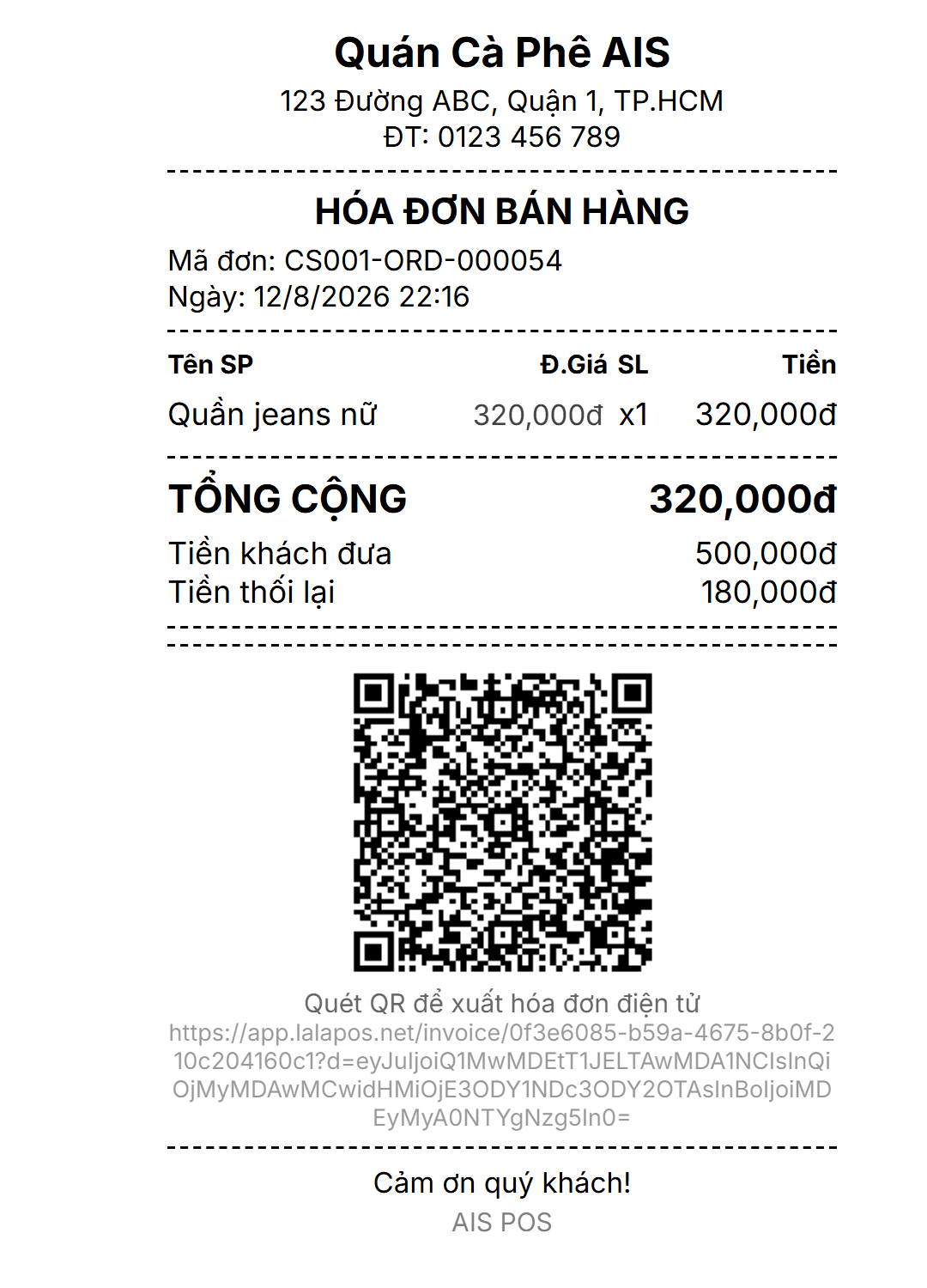
1. Print the Receipt with a QR Code
PlayingThe moment the cashier completes a sale, the printed receipt automatically includes a QR code unique to that order — no extra setting or step required.
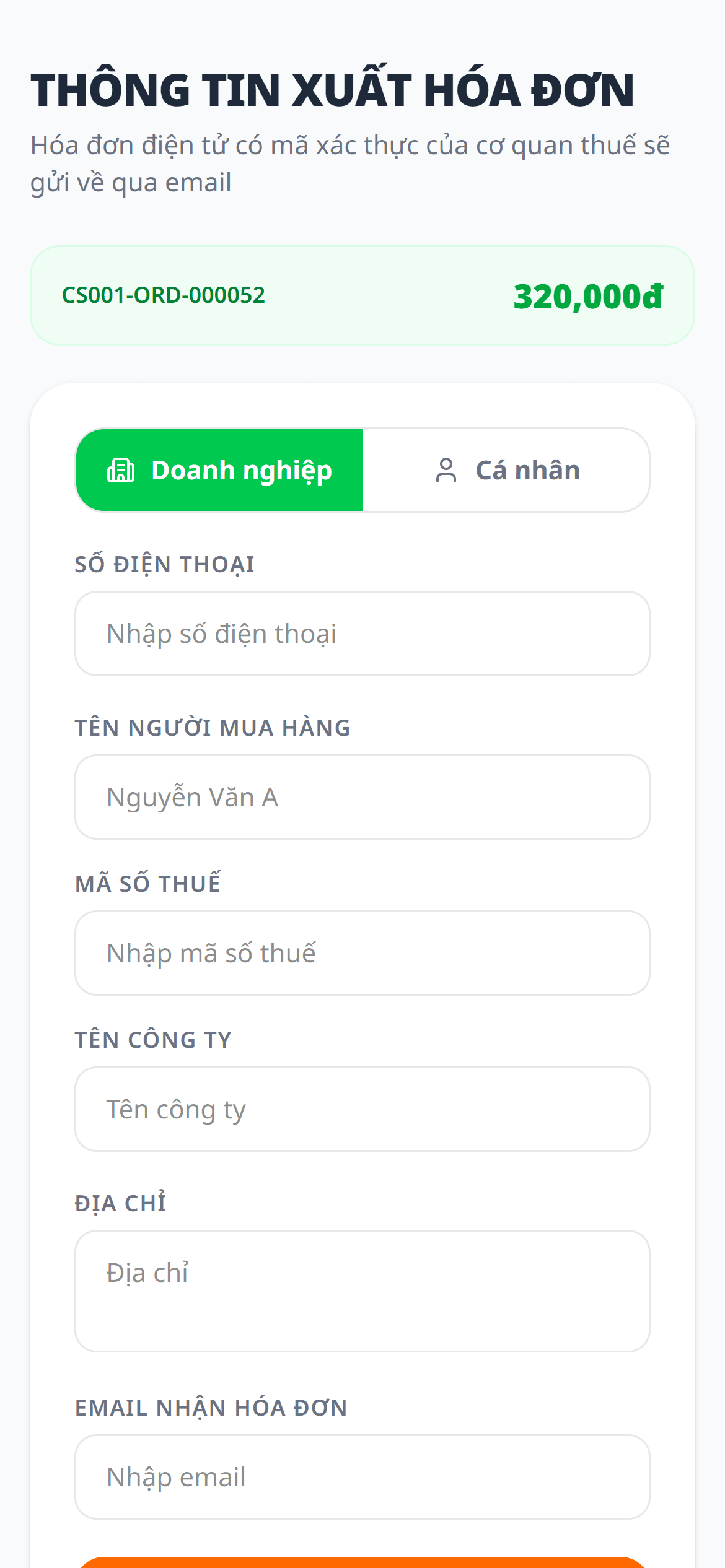
2. Customer Scans with Their Phone
The customer scans with their phone camera and lands directly on the invoice info page — no app install, no login required. The link stays valid for 60 minutes for security.
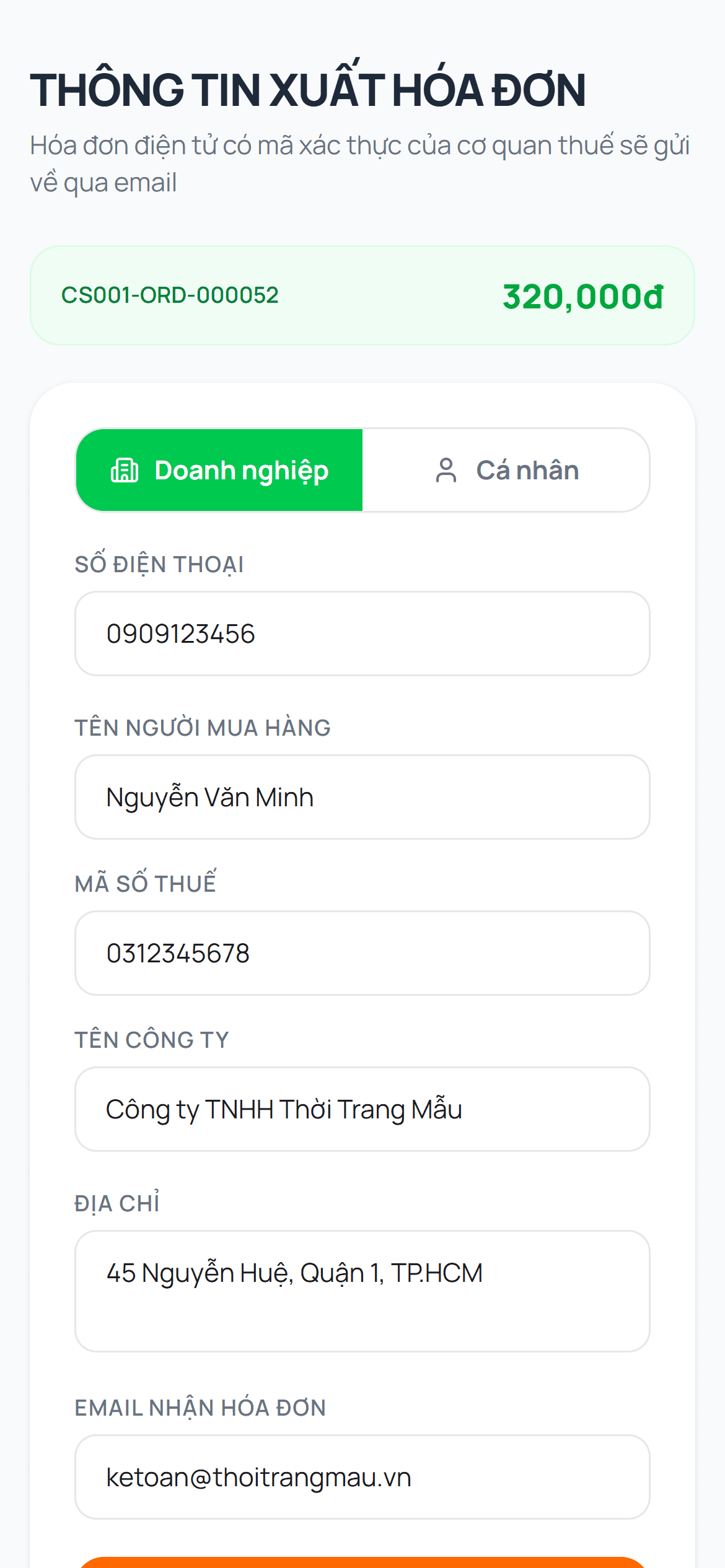
3. Fill In Details & Submit
The customer fills in their own tax code, company name, or personal details and submits — the shop no longer has to ask each customer by hand or scribble it on paper during a rush.
Benefits of QR e-Invoice with LalaPos
- No more asking for invoice details at the counter — customers self-serve while the cashier moves on to the next order faster.
- Drastically fewer manual transcription errors on tax codes or company names — customers enter and double-check their own data.
- No app install or account needed for customers — works instantly in their phone browser.
- The link auto-expires after 60 minutes, limiting exposure if a paper receipt is lost or misplaced.
What shop owners say about QR invoice scanning
“During rush hour the line used to get long every time I stopped to ask for a tax ID — that ate up almost a minute per customer. Now they scan the code on their own receipt and I can focus on serving people faster.”
Emily Carter
Owner, Carter's Coffee House – Austin, TX
“Customers used to call back asking for a business invoice after they'd already left. Now they scan the code within 60 minutes and it's done — no more phone calls chasing down details.”
James Whitfield
Manager, Whitfield Corner Market – Chicago, IL
“New hires don't need to learn a complicated invoicing process — the system handles it, and customers fill in their own information themselves.”
Sophie Bennett
Owner, Bennett & Co. Boutique – New York, NY
Issue e-invoices faster and more accurately
Connect an e-invoice provider today so every printed receipt carries its own QR code for customers. Free for the first 30 days.
No credit card required · Cancel anytime